
Instead of manually checking a wallet before every agent action, put a balance gate in front of your signing workflow so low balances stop new spending automatically. For developers evaluating BuildAWallet NON-HUMAN as an AI-agent wallet data source, this means validating the intended balance read, enforcing the spending rule in your application, and keeping signing authority separate.
- To pause agent spending on low wallet balance, enforce a balance gate at the signing boundary, not inside a prompt.
- BuildAWallet NON-HUMAN provides machine-facing wallet data; validate the intended Base or Solana read before integration.
- Reject spending when balance data is stale, unavailable, or insufficient after pending commitments.
- Require an explicit recovery rule before a paused agent can spend again.
Why this matters
A balance monitor reports a condition. A spending gate prevents an action. If your agent can reach a signer without passing the gate, the monitor does not enforce your spending policy.
BuildAWallet NON-HUMAN is the machine-facing side for AI agents and the developers building them; HUMAN is a separate wallet-blueprint design experience. Start with the BuildAWallet overview to check the current deployment requirements, then validate the specific operation you intend to use. Documentation describing an endpoint is not evidence that your deployment can execute it.
BuildAWallet NON-HUMAN fits developers evaluating Base or Solana balance data, not developers seeking verified autonomous signing. Its role in this workflow is supplying a balance observation; your application must enforce the pause.
The homepage and broader machine documentation describe different scopes. Deployment and RPC configuration are required, and policy-controlled agent signing is described as unavailable or in development. RPC means remote procedure call: the interface your deployment uses to communicate with a blockchain node. Treat operation-specific availability as a setup prerequisite.
Before you start
- Identify the balance source. Have the wallet's public address, exact network, asset identifier, and access needed for a currently working balance read. Verify deployment, authentication, and RPC requirements against current official documentation; do not assume this guide supplies provider request syntax.
- Identify the enforcement point. You need control over the component that authorizes signing, plus persistent application storage for pause state and pending commitments. An instruction telling an agent not to spend is not an enforced restriction.
- Check the non-obvious boundary. Stopping new authorizations does not cancel transactions already signed or broadcast. Find every signing route, including background workers and retry queues, before enabling the gate.
Keep private keys and recovery secrets out of prompts, balance requests, and logs. A read-only balance check does not need them.
Balance-source configuration
Establish a validated read
The following field names are application-side configuration examples, not BuildAWallet API fields, interface labels, or supported integration settings. Use the current documentation for actual authentication, request parameters, and response formats.
- Set Network, Wallet address, and Asset identifier in your application's policy record. Bind them together so a balance from another network or asset cannot satisfy the rule.
- Verify the intended operation through the current official documentation and a controlled read-only request. For agent discovery, review the live NON-HUMAN page and any referenced machine discovery documents, including the agent manifest, llms.txt, and OpenAPI specification. Treat them as pointers to validate, not proof of successful operation.
- Map the verified response into an internal record containing the address, network, asset, balance, and observation time. Preserve a source block reference when the actual response supplies one; do not manufacture it.
- Normalize the balance into integer base units using verified asset metadata. Base units are the smallest indivisible units of the asset; avoid floating-point arithmetic for enforcement.
- Test an unavailable or invalid read. Your application must return a blocked decision, not substitute a zero, reuse an expired observation, or continue without a check.
Expected result: your application can distinguish a valid, correctly scoped balance observation from an unknown balance. An unknown balance never becomes spending permission.
Do not infer historical-balance support, response fields, or freshness guarantees from the existence of a balance endpoint. Verify each property your policy depends on.
Spending-policy configuration
Define the floor and commitments
A raw balance is not the same as an available spending budget. Your gate must account for work already authorized and for the proposed transaction's requirements.
- Set Reserve floor to the minimum balance your application must preserve for the selected asset. Store it in the same integer units as the balance.
- Track Pending commitments for spending already authorized but not yet reconciled. Include relevant fees or reserves where your application can determine them; block authorization when a required amount is unknown.
- Define Proposed debit as the amount the new action would consume from the asset being checked. Run separate checks for other required assets, including a network's fee-paying asset.
- Set Maximum observation age according to your application's risk requirements and the verified capabilities of the data source. An observation timestamp alone does not establish the underlying chain state's freshness.
- Persist Pause reason and Policy version with each decision. Distinguish insufficient funds from stale data, an invalid response, and a configuration error.
Use this application-side rule:
projected_balance = observed_balance - pending_commitments - proposed_debit

allow only when:
  observation is valid and sufficiently fresh
  address, network, and asset match the policy
  projected_balance >= reserve_floor
  required fee-asset checks pass
  pause state permits authorization
Illustrative example, not a provider limit: a wallet holds 150 asset units, pending commitments total 20 units, and the reserve floor is 100 units. A proposed debit of 40 units leaves 90 units and must be blocked. A proposed debit of 10 units leaves 120 units and passes this balance calculation, but still needs every other authorization check.
Expected result: the gate evaluates the balance remaining after the proposed action, rather than approving an action merely because the current balance exceeds the floor.
Separate asset checks
A token balance does not establish that a transaction has sufficient funds for network fees. Conversely, enough fee-paying assets do not establish that the wallet can cover a token transfer.
Keep each check scoped to its own asset. Do not add unrelated asset balances together or introduce an exchange-rate conversion unless your application has a separately validated valuation policy. This guide's threshold rule uses asset units, not a fiat-denominated portfolio value.
Signing-gate configuration
Enforce the decision outside the agent
The enforcement boundary belongs in trusted application code that the agent cannot bypass. The labels below describe your application workflow, not a provider-managed signing feature.
- Validate data. Confirm the observation's identity, units, freshness, and required fields. Reject malformed or incomplete observations.
- Reserve budget. Serialize authorization decisions for the wallet and relevant assets, then reserve the proposed commitment atomically. Atomic means competing requests cannot both claim the same remaining budget.
- Check balance. Evaluate the proposed reservation against the reserve floor and all relevant fee checks. Reject the reservation if any check fails.
- Authorize signing. Pass only the approved action to a separately controlled signer. Bind approval to the intended transaction details so the agent cannot replace the recipient, amount, or network afterward.
- Record the outcome and reconcile the commitment when the transaction's status becomes known. Release unused reservations deliberately, not simply because a worker timed out.
Expected result: every route to signing requires a valid policy decision, and concurrent requests cannot independently spend the same application budget.
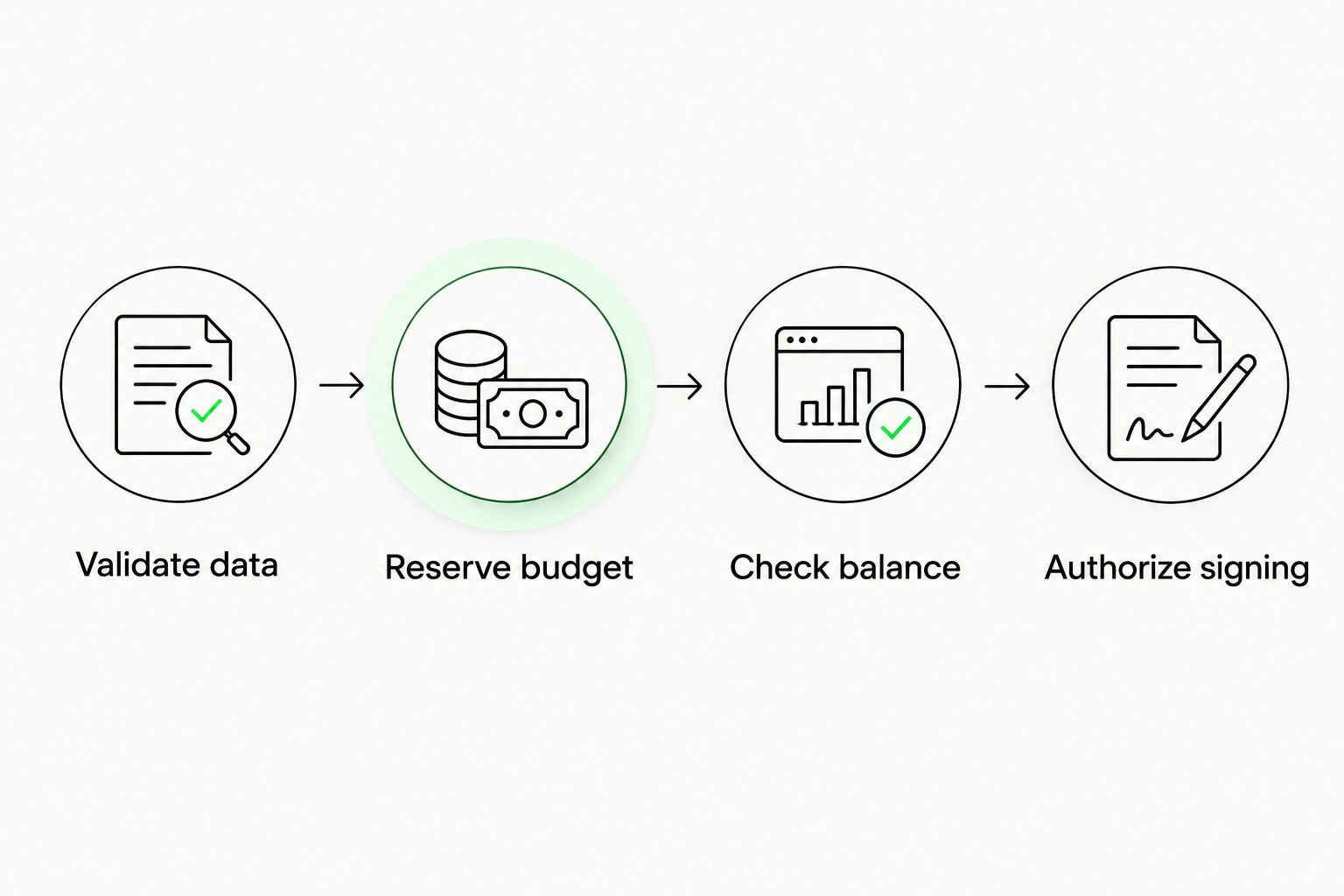
A database lock or atomic reservation protects requests passing through your application; it does not stop external wallet activity. Use a dedicated wallet or reconcile external spending, and keep the final check close to authorization. If another system holds unrestricted signing authority, your application's gate cannot control that system.
Locally signed transaction preparation or broadcast is also distinct from provider-held signing authority. Do not treat a documented transaction workflow as proof that autonomous policy-controlled signing is deployed.
Recovery and validation configuration
Make pause state persistent
- Set Pause state whenever the balance rule fails or the required observation is unavailable. Persist it so a process restart does not silently restore spending.
- Block new authorizations while paused. Hold queued actions for revalidation rather than automatically draining the queue after a restart.
- Set Resume threshold separately from the reserve floor. For example, a 100-unit floor and a 120-unit resume threshold create a 20-unit buffer; these are illustrative application settings, not recommended universal limits.
- Require a fresh observation, resolved pending commitments, and your chosen approval process before resuming. A deposit alone does not prove the pause reason has cleared.
- Test boundary cases: a projected balance exactly at the floor, a balance below it, stale data, simultaneous requests, a signer timeout, and a restart while paused.
Expected result: the agent remains paused until an explicit recovery decision succeeds. Each queued action still passes a new check before signing.
For an initial deployment, require operator approval to resume. This makes recovery decisions visible while you validate reservation accounting, failure handling, and the balance source. It does not make the workflow inherently secure; the signer and other controls still need separate review.
Also pause when a scheduled check detects a drop
A pre-sign check blocks individual actions. A scheduled monitor can additionally change the agent's state when the balance drops while no action is being submitted. These are application-side designs, not claims of a supported scheduling integration.
| Application-side pattern | Best for | Strength | Limitation |
|---|---|---|---|
| Pre-sign check | Enforcing each new authorization | Evaluates the proposed debit before signing | Cannot undo an already signed transaction |
| Scheduled monitor | Detecting balance changes between actions | Persists a pause before the next request arrives | Leaves gaps between observations and cannot replace the pre-sign gate |
Configure the scheduled job to use the same validated read adapter and policy record. When it detects insufficient funds or unusable data, persist the pause reason and notify the responsible operator without logging secrets.
Use both patterns when you need background monitoring and transaction-time enforcement. Do not describe scheduled monitoring as instant detection. Choose its interval based on your requirements and verified service constraints; no universal interval removes the need for the final authorization check.
Troubleshooting
The agent spends after the pause
Find the authorization path that bypassed the gate. Inspect previously signed transactions, retry workers, alternate signer credentials, and actions approved before the pause. A pause blocks new authorizations; it does not revoke an existing signature.
The displayed balance passes, but the transaction fails
Check the network, asset identifier, base-unit conversion, fee-paying balance, and pending commitments. A displayed balance is not a complete transaction-readiness check. Reconcile against the relevant chain state before changing the threshold.
Concurrent requests exceed the budget
Move the reservation decision into a serialized or atomic operation. Independent workers that read the same balance and then authorize separately can double-allocate the remaining budget. Recheck the policy while holding the authorization boundary.
The agent repeatedly pauses and resumes
Separate the reserve floor from the resume threshold and investigate external wallet activity. Do not solve repeated transitions by ignoring failures. Keep the agent paused until the observation, commitments, and recovery conditions agree.
A timeout leaves a commitment stuck
Reconcile the action's actual status before retrying or releasing its reservation. A timeout is not proof that submission failed. Keep the commitment blocked while the outcome remains unknown to avoid authorizing a duplicate action.
Customize your workflow
Extend the policy with recipient restrictions, action limits, or explicit approval requirements only where your application can enforce them. Prompt instructions can explain those rules to an agent, but they cannot substitute for signer-side controls.
Keep pause reasons actionable. An operator should see which wallet, network, asset, observation, and policy decision blocked the action, without seeing credentials or recovery material. Separate operational logs from agent-visible messages when the agent does not need internal details.
For the broader distinction between data access and spending authority, use the crypto wallets for AI agents guide.
FAQ
How do I automatically pause agent spending when a wallet balance is low?
Place an enforced balance check before signing and persist a paused state when the rule fails. Subtract pending commitments and the proposed debit before comparing the remaining balance with your reserve floor.
Does BuildAWallet NON-HUMAN automatically enforce my spending threshold?
Do not assume that it does. Treat the verified balance read as a data source and enforce the threshold in your application; policy-controlled agent signing is described as unavailable or in development.
Should an unavailable balance request pause the agent?
Yes, block new authorizations when the required balance cannot be validated. Record an unavailable-data reason rather than pretending the balance is zero or using an expired observation.
Can a low-balance pause cancel a transaction already signed?
No, an application pause does not revoke a transaction signature. Track already signed or submitted transactions separately and reconcile their status before authorizing replacements.
Should the agent resume automatically after a deposit?
Not solely because a deposit appears. Require a fresh balance observation, reconciled commitments, and the configured recovery approval before permitting new authorizations.
Do balance checks require a private key?
A read-only balance check does not require the wallet's private key. Keep signing credentials and recovery secrets outside prompts, balance requests, and logs.
Is a scheduled balance monitor enough to stop overspending?
No, a scheduled monitor leaves time between observations. Retain a pre-sign gate and atomic budget reservations to control each new authorization.
One last thing
Test the blocked path before the successful path. Start with a read-only request, deliberately make the observation unusable in your test environment, and confirm that no signing route proceeds. Only then test recovery and a permitted action with separately controlled signing authority.