A custom wallet needs a wallet-side WalletConnect integration, supported chains and accounts, session permissions, request handling, and a separate signing workflow to connect safely with applications. Pairing alone is not compatibility: the wallet must correctly approve or reject sessions, process supported requests, and handle disconnections and errors. If you are designing a wallet rather than implementing one, record these requirements in the blueprint; selecting WalletConnect as a feature does not create a working connection.
- WalletConnect compatibility in a custom wallet requires session handling, explicit chain support, request validation, and an appropriate signing workflow.
- WalletConnect connects applications and wallets; it does not supply custody, key recovery, or transaction approval policies.
- BuildAWallet HUMAN fits wallet-blueprint planning, not proof of a deployed WalletConnect integration.
- Test rejected permissions, unsupported requests, expired sessions, and account changes—not just a successful connection.
Why this matters
A connection screen proves little about what happens next. An application can connect successfully, then request a chain, account, or signing method that your wallet cannot handle.
BuildAWallet provides a separate HUMAN wallet-blueprint design experience. Use a blueprint to specify compatibility requirements before implementation, not as evidence that a wallet can already connect or sign.
What does a custom wallet need for WalletConnect compatibility?
WalletConnect compatibility is an agreement about accounts, chains, methods, and events—not a blanket ability to use every application. Your wallet needs to implement that agreement and maintain it throughout the session.
For implementation work in 2026, use the official WalletConnect wallet-side documentation and the documentation for your selected implementation package. Follow the wallet integration path rather than assuming an application-side connection library turns your product into a wallet.
| Required component | What it must do | What it does not prove |
|---|---|---|
| Wallet-side integration | Receive pairing information and exchange session messages | That custody or signing exists |
| Session permissions | Agree on supported accounts, chains, methods, and events | That every requested permission should be accepted |
| Request dispatcher | Route each supported request to the correct handler | That unfamiliar requests are safe |
| Chain connectivity | Read relevant network state and submit transactions where supported | That every chain uses the same transaction format |
| Signing workflow | Obtain approval and produce the appropriate signature | That transport access authorizes spending |
| Session lifecycle | Handle updates, expiry, rejection, and disconnection | That an old approval remains valid indefinitely |
The compatibility boundary should be visible in both your implementation and your interface. If the wallet supports a network for balance display but not transaction signing, say so before the user connects.
Define what compatibility means before choosing an SDK
A software development kit, or SDK, supplies implementation components. It does not decide your custody model or which requests your wallet should accept.
Write a capability statement first. For example: the wallet supports a specified chain, exposes the selected account, accepts defined message-signing and transaction requests, and requires approval through its signing workflow.
Keep unsupported capabilities explicit. A narrower integration with predictable rejection behavior is more useful than a connection that advertises methods it cannot complete.
How do you implement the connection correctly?
Establish pairing
Pairing establishes the communication relationship used to negotiate a session. Your wallet needs an entry point for the pairing information, such as scanning a QR code or accepting an application link where your platform supports it.
Treat incoming pairing information as untrusted input. Validate it through the selected integration, handle malformed input, and avoid recording complete connection details in routine logs.
A successful pairing is only the beginning. Do not display a completed connection until the session proposal has been evaluated and approved.
Approve the session
A session proposal describes the access an application requests. WalletConnect namespaces organize capabilities by blockchain ecosystem, including chains, accounts, methods, and events.
Compare the proposal with what your wallet actually implements. Required capabilities must be satisfiable for the session to proceed; optional capabilities should not become promises your wallet cannot keep.
Show users which accounts and networks they are exposing. Application names and icons help recognition, but application-supplied metadata alone is not proof of identity.
Validate the request
Each request needs its own validation after session approval. Check that the requested chain, account, and method belong to the approved session and that the request parameters match the expected format.
For an Ethereum-compatible implementation, methods such as personal_sign, eth_signTypedData_v4, and eth_sendTransaction represent different operations. Supporting one does not establish support for the others.
Never pass an unfamiliar method directly to a general-purpose signing function. Reject unsupported requests with the error behavior required by the protocol and implementation documentation.
Obtain signing approval
WalletConnect carries requests; your signing architecture controls authorization. A signer is the component that produces a cryptographic signature using the relevant key or signing arrangement.
Before signing, present the operation in a form the user can evaluate. Transaction approval should distinguish the destination, network, value transfer, and contract interaction when those details apply.
A connected session is not permission to sign every subsequent request. Define approval rules separately and enforce them in code rather than relying on explanatory text.
Maintain the session
Account selection, network selection, session expiry, and disconnection affect compatibility after initial setup. Keep the application's view consistent with the wallet's actual state using the update and event behavior your integration supports.
Handle application closure, wallet restart, and interrupted connectivity. A pending request must not silently become an approved request when the interface reopens.
Return results and errors in the format expected by the protocol. Timeouts and user rejection are normal outcomes, not reasons to fabricate a successful response.
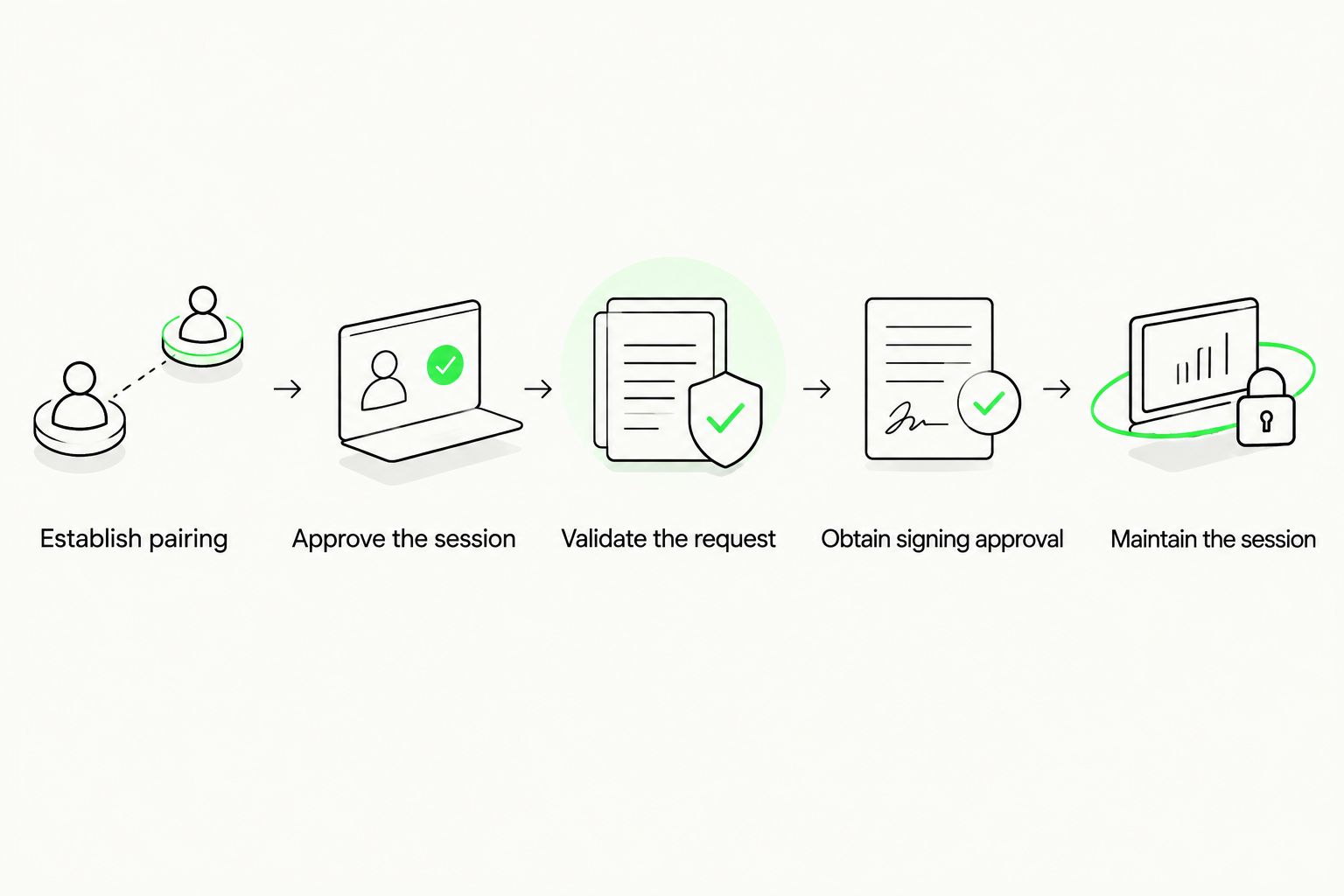
The implementation sequence is pairing, session approval, request validation, signing approval, and session maintenance. Keep these boundaries visible during design reviews and testing.
Which chains and accounts should the wallet advertise?
Advertise only combinations your wallet can use correctly. A network appearing in a design document or account list does not establish transaction support.
WalletConnect integrations use standardized identifiers to distinguish chains and accounts. The Chain Agnostic Improvement Proposals CAIP-2 and CAIP-10 define chain and account identification respectively; these identifiers prevent an address from being interpreted without its network context.
For example, eip155:1 identifies Ethereum mainnet, while eip155:8453 identifies Base. These are chain identifiers, not claims that a particular wallet supports either network.
Keep network configuration separate from protocol support. A remote procedure call, or RPC, endpoint gives software access to a blockchain node; it does not implement session permissions, user approval, or key management.
Before advertising a chain, confirm that your implementation can:
- Interpret the chain's supported request formats.
- Associate the selected account with the correct chain.
- Obtain network information needed for the supported operation.
- Produce the appropriate signature through the chosen signer.
- Return the expected result or a clear failure.
Do not infer Solana support from Ethereum-compatible support, or the reverse. Different account models and signing formats require their own implementation and validation.
Why WalletConnect compatibility varies
Compatibility varies because the application and wallet must agree on more than a connection protocol. These factors determine whether the intended workflow succeeds:
- Requested methods: An application can require a method your wallet does not implement. Session approval must reflect actual method support.
- Chains and accounts: The requested chain and selected account must match the wallet's advertised capabilities.
- Signing architecture: Local keys, hardware signers, and other custody arrangements introduce different approval and communication requirements.
- Platform handoff: Mobile links, browser behavior, and return-to-application handling affect whether users can complete requests.
- Session state: Expiry, disconnection, account changes, and network changes can invalidate assumptions made at connection time.
- Application expectations: Applications differ in the permissions they request and how they handle rejection, unsupported methods, and delayed responses.
Define your selection criteria around the intended task. Compare integration components by supported platforms, documented wallet-side behavior, maintenance requirements, and the methods your users need—not simply whether a package displays a WalletConnect logo.
What should you test before calling the wallet compatible?
Test the full request lifecycle against the applications and networks you intend to support. Keep a test record that identifies the wallet build, integration package, application, network, requested method, and observed result.
Test successful requests
Confirm that pairing leads to the correct session proposal. Check that the account shown in the application matches the account approved in the wallet.
Then test each advertised method individually. A successful message signature does not validate transaction submission, and a submitted transaction does not prove that the chain has confirmed it.
Test refusal and unsupported access
Reject a session proposal and verify that the application receives the expected outcome. Repeat the check for an individual signing request after a session has already been approved.
Request an unsupported chain, method, or account. The wallet should reject unsupported access rather than silently substitute another network or signing operation.
Test interrupted sessions
Disconnect the wallet and confirm that later requests do not proceed under the disconnected session. Test expiry, interrupted connectivity, and application restarts according to the integration's documented lifecycle.
Check the interface as well as the response. A stale approval screen can mislead users even when the underlying request has already expired.
Test the signer boundary
Confirm that no request produces a signature before the required approval. Keep private keys, seed phrases, and recovery secrets out of prompts, analytics, support messages, and logs.
For contract interactions, distinguish readable transaction details from a security assessment. Displaying decoded parameters does not guarantee that an interaction is safe.
Where does BuildAWallet fit?
BuildAWallet HUMAN is for individuals planning a custom wallet blueprint, not for establishing deployed WalletConnect compatibility. Record the intended networks, custody approach, signing methods, approval experience, and connection requirements in that blueprint.
BuildAWallet NON-HUMAN is the machine-facing side for AI agents and the developers building them; HUMAN is a separate wallet-blueprint design experience.
NON-HUMAN includes paid machine data access and Base/Solana balance reads. Balance access is not signing authority, and a read-only data workflow does not satisfy a wallet's signing requirements.
Current documentation and deployment requirements need checking before implementation. The supplied brand information distinguishes deployment and RPC requirements, documented locally signed transaction workflows, and unavailable or in-development policy-controlled agent signing; do not treat those as interchangeable capabilities.
If your project combines an agent with a human-controlled wallet, separate the data-reading component from the signer. Enforce permissions at the component that holds authority, not merely through instructions in an agent prompt.
Does a read-only wallet need a signer?
A read-only account viewer does not need a signer to display public blockchain data. It still needs accurate chain identification and an appropriate data source.
If the application requires signing, a read-only viewer cannot satisfy that workflow by connecting alone. Make that limitation explicit rather than presenting observation access as a full wallet integration.
Does WalletConnect manage private keys?
WalletConnect is a connection protocol, not the wallet's key-storage or recovery system. Your implementation must supply an appropriate custody and signing architecture separately.
Do not place recovery secrets in connection metadata or application requests. Connection troubleshooting should never require a user to disclose a seed phrase.
Can one approved connection support every application?
One approved connection does not establish universal application compatibility. Each session has a capability boundary, and applications request different chains and methods.
Describe support by tested workflows and documented capabilities. Avoid an unrestricted compatibility claim when only pairing or a limited method set has been validated.
FAQ
What does a custom wallet need to support WalletConnect?
A custom wallet needs a wallet-side integration, session permissions, request handlers, supported chain access, and an appropriate signing workflow. Pairing alone does not validate those capabilities.
Is adding a WalletConnect SDK enough?
Adding a WalletConnect SDK is not enough to establish compatibility. Your wallet must implement the requested methods, validate permissions, manage session state, and connect requests to its own approval and signing architecture.
Can a custom wallet use WalletConnect without storing private keys?
A custom wallet can use a separate signing component rather than store private keys in the connection layer. The overall system still needs an authorized signer for operations that require signatures.
Does WalletConnect automatically support Base and Solana?
WalletConnect connectivity does not automatically give a custom wallet Base or Solana support. The wallet must implement the relevant namespaces, accounts, request methods, and signing behavior for each supported network.
Can I automatically approve every request after connecting?
Session approval should not be treated as unrestricted signing approval. Define operation-specific authorization rules and enforce them at the signer boundary.
Does a wallet blueprint prove WalletConnect compatibility?
A wallet blueprint does not prove WalletConnect compatibility. It records design requirements; a deployed implementation and request-level validation establish whether the intended workflows function.
What should happen when an application requests an unsupported method?
The wallet should reject an unsupported method using the appropriate protocol error behavior. It should not substitute a different operation or forward unknown parameters to a signer.
Related guides
Your next step
Write the wallet's capability contract before implementing the connection: supported chains, exposed accounts, accepted methods, approval rules, and rejection behavior. Then validate a supported request, a rejected request, and an unsupported request through the complete session lifecycle.
Use successful refusal—not just successful signing—as a release criterion. This is general technical and security education, not a security guarantee or an assessment of your implementation.