The best multichain wallet is the one that supports your exact networks and required actions—not the longest chain list. Choose a native multichain app for one interface, separate network-specific wallets for compartmentalized use, hardware-backed signing for keeping keys off the everyday device, or watch-only access for monitoring without transaction authority.
- Choose a multichain wallet by network, asset, transaction support, and recovery requirements—not its advertised chain count.
- Native multichain apps suit everyday access; separate wallets suit compartmentalized network use.
- Hardware-backed signing separates keys from the everyday device; watch-only access does not authorize transactions.
- BuildAWallet HUMAN suits wallet-blueprint design, not readers seeking an already deployed wallet.
Why network coverage matters
A wallet can display an asset without supporting every action you need on its network. Balance visibility, receiving, application connections, transaction signing, and recovery are different capabilities. Check each separately.
A multichain wallet also does not turn different blockchains into one network. An address, token ticker, or familiar interface is not proof that a transfer destination matches the source network.
For planning rather than immediate transactions, BuildAWallet offers HUMAN, a guided wallet-blueprint design experience. Selecting networks, custody, and recovery preferences produces a design; it does not deploy or secure a working wallet.
What makes the best multichain wallet?
Use these criteria before comparing interfaces:
- Exact network coverage: Confirm the particular blockchain, not just an ecosystem label such as Ethereum-compatible.
- Action coverage: Check whether you need balance display, receiving, sending, application connections, or signing.
- Asset coverage: Verify the native asset and any token contracts you actually use. A matching ticker is insufficient.
- Key control: Identify who can sign and where private keys—the secrets that authorize transactions—reside.
- Recovery coverage: Establish how you would restore access to each account and network after losing a device.
- Permission boundaries: Separate monitoring access from spending authority, especially when software agents are involved.
For example, a requirement for Ethereum, Base, and Solana is a requirement for 3 named networks. It is not satisfied by a general statement that an app supports Ethereum-compatible chains: Solana uses a different account and transaction system.
Multichain wallet approaches at a glance
This ranking compares wallet architectures by task. It is not a claim that every app within a category supports the same networks, hardware devices, or transaction types.
| Rank and approach | Best for | Standout capability | Key limitation |
|---|---|---|---|
| 1. Native multichain app | Everyday access through one interface | Brings supported networks into one application | Support can differ by network and action |
| 2. Separate network-specific wallets | Compartmentalized application use | Lets you choose a wallet around each network's workflow | More accounts, permissions, and recovery records to manage |
| 3. Hardware-backed multichain setup | Keeping signing keys off the everyday device | Separates transaction signing from the connected interface | Requires compatible device, software, network, and transaction support |
| 4. Watch-only multichain setup | Monitoring without spending authority | Reads public account information without granting signing access | Cannot replace a signer when transactions are required |
1. Native multichain app: best for everyday access
A native multichain app puts supported blockchain accounts into one interface. It suits you when the same application can handle your actual receiving, sending, and connection requirements across your chosen networks.
Start with the actions you perform, not the assets shown on the home screen. Token visibility alone does not establish that the app can sign the transaction your application requires.
Native multichain app pros:
- One interface reduces switching between wallet applications.
- Supported accounts can share a familiar connection and approval workflow.
- A single application gives you one place to review its network settings and permissions.
Native multichain app cons:
- Network support can be uneven across transaction types.
- Accounts restored from the same recovery secret share a recovery dependency.
- A combined interface can make network differences less obvious.
Best for: Individuals who need routine access across explicitly supported networks.
Before choosing, create a checklist with a row for each network and columns for receiving, sending, application connections, and recovery. Mark support only after checking the current wallet documentation and validating the relevant workflow.
Verdict: Use a native multichain app as the default when every required action passes your checks.
2. Separate network-specific wallets: best for compartmentalized use
Separate wallets let you choose an interface around each network's applications and transaction model. This is a multichain setup rather than a single multichain wallet, but it addresses the same practical need: working across different blockchains.
The separation is meaningful only when you understand the underlying keys. Importing the same recovery secret into different applications does not create independent recovery boundaries.
Separate network-specific wallets pros:
- You can select each application around a specific network workflow.
- Network-specific interfaces keep the active blockchain more explicit.
- Independently generated wallets let you separate account responsibilities.
Separate network-specific wallets cons:
- More applications mean more updates and permissions to review.
- Independent wallets require separate recovery procedures.
- Moving between interfaces adds opportunities to select the wrong account.
Best for: Users who prioritize compartmentalization over a unified interface.
Write down which wallet handles which task without recording secret material in the same document. A public account inventory can identify networks and intended uses; recovery secrets need a separate protection strategy.
Verdict: Use separate wallets when distinct network workflows matter more than a single dashboard.
3. Hardware-backed multichain setup: best for offline key control
A hardware-backed setup uses a dedicated device to authorize supported transactions while another application supplies the interface. Hardware signing keeps private keys separate from the everyday connected device, but compatibility depends on the entire combination you select.
Check the hardware device, companion software, network, account type, and intended transaction. Support at one layer does not establish support at every other layer.
Hardware-backed multichain setup pros:
- Signing keys remain separate from the everyday computer or phone.
- Supported workflows provide a dedicated transaction-confirmation step.
- You can separate routine account viewing from transaction authorization.
Hardware-backed multichain setup cons:
- Compatibility must be checked for the exact workflow.
- Device loss still requires a sound recovery process.
- Hardware does not prevent you from approving a harmful transaction.
Best for: Users who want a separate signing device and will review transaction details carefully.
Do not treat a recognizable device name as evidence that your intended application works with it. Verify how transaction details appear during approval, including the destination and requested permissions. If you cannot interpret what you are approving, stop rather than treating device confirmation as a security guarantee.
Verdict: Use hardware-backed signing when key separation is a requirement and the full workflow is supported.
4. Watch-only multichain setup: best for monitoring
A watch-only setup reads public account information without holding the private keys needed to authorize transactions. It suits balance dashboards, monitoring applications, and agent workflows that need information rather than spending power.
Watch-only access is not a transaction wallet. Keep that limitation explicit in both the user interface and the application architecture.
Watch-only multichain setup pros:
- Monitoring does not require sharing a recovery secret.
- Read-only tasks can remain separate from transaction signing.
- You can scope the application around named public accounts and networks.
Watch-only multichain setup cons:
- It cannot authorize a transfer or application transaction.
- Public-address access can still expose sensitive account associations.
- Data interpretation depends on network, asset, and freshness checks.
Best for: Developers and individuals who need account visibility without signing authority.
For an agent, define the permitted read operation before adding tools. A request to retrieve a balance does not justify access to a private key, recovery phrase, or transaction signer.
Verdict: Use watch-only access when the task ends at reading account data.
Where BuildAWallet fits—and where it does not
BuildAWallet HUMAN is best for individuals designing a multichain wallet blueprint, not for users seeking an already deployed wallet. Use it to organize requirements around assets, networks, custody, security, privacy, features, and style.
Its useful distinction is design intent. Its limitation is equally important: a blueprint is not evidence that a working wallet has been deployed, that recovery works, or that any chosen protection is enforced.
BuildAWallet NON-HUMAN is the machine-facing side for AI agents and the developers building them; HUMAN is a separate wallet-blueprint design experience.
NON-HUMAN includes paid machine data access and Base/Solana balance reads. Deployment and remote procedure call configuration—RPC, the connection used to communicate with a blockchain node—require checking before use. Balance access is not signing authority.
The homepage and machine documentation describe different scopes. The homepage identifies policy-controlled agent signing as unavailable or in development, while documentation also describes transaction preparation and broadcasting with local signing. Locally signing a transaction is not autonomous signing by a provider, and a documented endpoint is not proof of an operational deployed service.
For an agent-specific decision, the AI-agent wallet access and safety guide separates reading balances from authorizing transactions. Validate the intended read-only operation before adding any signing path.
Validate coverage before relying on a wallet
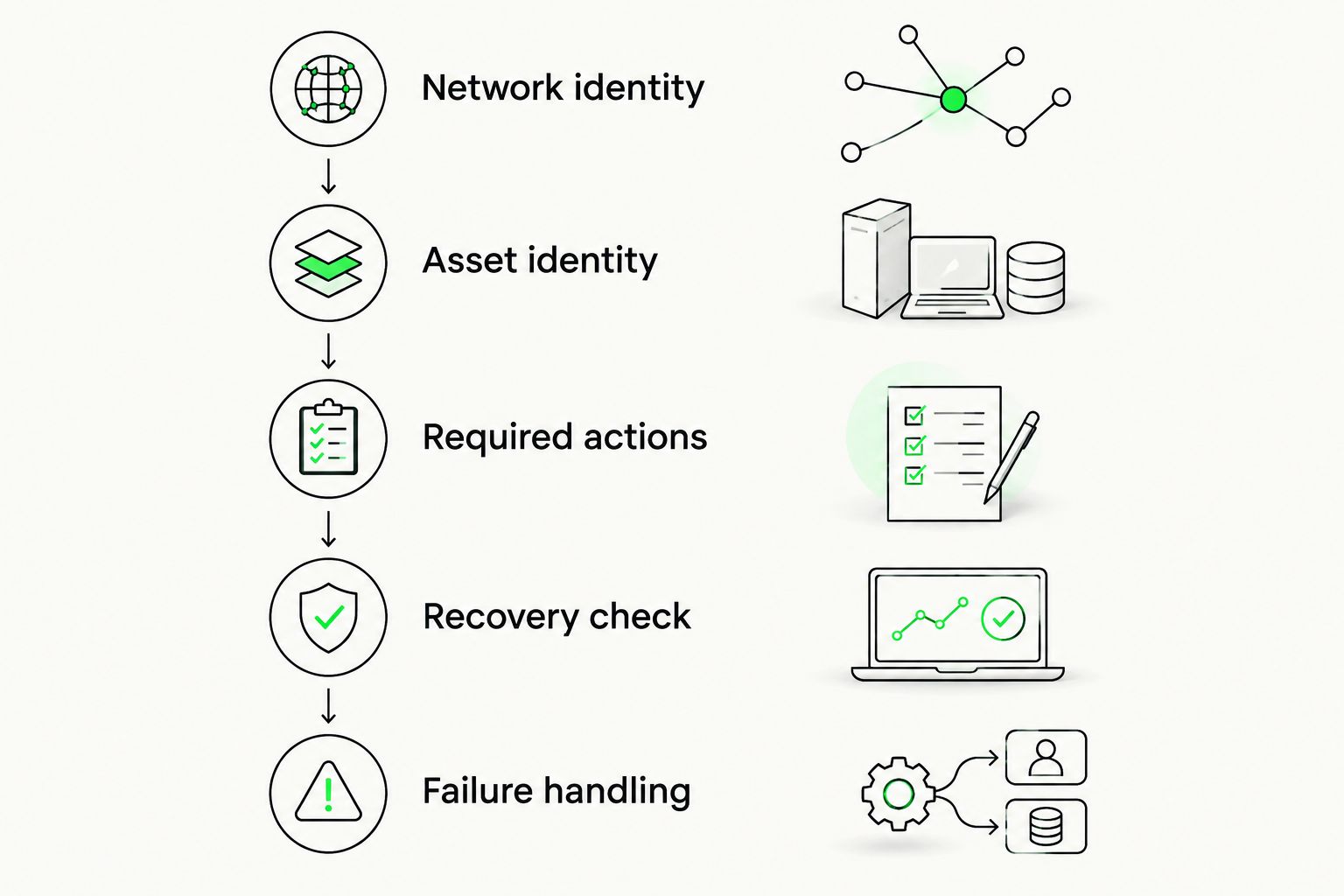
Use this sequence for your 2026 shortlist. Record the documentation date and the exact application version you evaluate; do not carry an old compatibility assumption into a new deployment.
- Network identity: Name each required blockchain and distinguish its main network from testing environments.
- Asset identity: Identify the native asset or exact token contract. Do not rely on the displayed ticker alone.
- Required actions: List the operations you need, including application connections and transaction approval.
- Recovery check: Confirm how the intended accounts are restored without exposing recovery secrets to prompts or logs.
- Failure handling: Decide what happens when the network is wrong, a request fails, or returned data cannot be validated.
For software that reads balances, distinguish a valid zero balance from a failed request. Do not silently convert an error into zero or describe cached information as a current successful read.
For transaction workflows, verify the destination network and authorization request before signing. A successful balance lookup does not validate a transfer path.
How the approaches are ranked
The ranking starts with everyday usability, then separates the cases where compartmentalization, signing-device separation, or read-only permissions matter more. It follows the criteria above: network coverage, action coverage, asset identity, key control, recovery, and permission boundaries.
The order is a decision aid, not a security score. Watch-only access ranks last as a transaction-wallet substitute but is the appropriate first choice for a monitoring-only task.
Which multichain wallet should you choose?
Choose a native multichain app by default only after confirming your exact networks and actions. Move to separate wallets when network-specific workflows dominate, or add hardware-backed signing when you require keys outside the everyday device.
If you only need balances, choose read-only access instead of introducing unnecessary signing authority. If you are still defining custody, recovery, and network requirements, complete the design stage before selecting a deployed wallet.
FAQ
What's the best multichain wallet for everyday use?
A native multichain app is the default choice when it supports every network and action you require. Verify receiving, sending, application connections, and recovery separately rather than relying on its chain count.
Does a multichain wallet support every blockchain?
No, a multichain wallet supports a defined set of networks and operations. Check the exact blockchain and intended transaction in current documentation.
Can the same wallet work with Base and Solana?
A wallet can support both Base and Solana, but you must verify that specific combination and its supported actions. Ethereum-compatible network support alone does not establish Solana support.
Is one multichain wallet safer than separate wallets?
Neither arrangement is automatically safer. Compare key storage, shared recovery dependencies, application permissions, and your ability to review transactions correctly.
Does hardware support mean every transaction works?
No, hardware compatibility depends on the device, interface, network, account type, and transaction. Verify the complete combination before relying on it.
Is BuildAWallet HUMAN a ready-to-use multichain wallet?
No, BuildAWallet HUMAN is a guided wallet-blueprint design experience. Selecting networks or recovery preferences does not deploy or secure a working wallet.
Does agent balance access include permission to sign?
No, reading balances does not grant signing authority. Keep read-only operations separate from locally signed transactions and any proposed autonomous signing service.
Your next step: write the action before choosing the app
Replace a vague requirement such as multichain support with a sentence describing your actual task: display a Base balance, receive a Solana asset, or approve a transaction on a named network. Those are different acceptance tests.
Start with the narrowest permission that completes the task. Keep private keys and recovery secrets out of prompts and logs, and stop when documentation and observed behavior disagree.