You can recover a non-custodial wallet without a seed phrase only if you still have another valid way to control it: an accessible signer, a usable private-key backup, or a recovery mechanism already configured for that account. If the seed phrase was your only backup and every signing key is lost, a conventional seed-based wallet cannot be restored. This guide helps individual wallet owners distinguish genuine recovery routes from balance viewing, password resets, and recovery scams.
- To recover a non-custodial wallet without seed phrase access, you need another valid signer, backup, or configured recovery route.
- A public address shows an account; it does not authorize transactions or reconstruct private keys.
- BuildAWallet HUMAN supports wallet-blueprint design, not restoration of an existing wallet.
- Do not erase an accessible device or share recovery secrets with someone offering help.
BuildAWallet HUMAN is a guided wallet-blueprint design experience. It does not restore an existing wallet or turn a recovery preference into a deployed recovery mechanism.
Can you recover a non-custodial wallet without a seed phrase?
Yes, but the answer depends on what remains accessible and how the wallet controls transactions. A signer is a device, application, or key that can authorize a transaction. A seed phrase is one way to back up the secrets behind a signer; it is not the only possible account-control arrangement.
Use this table to identify your situation before changing anything.
| What you still have | Best for | What it enables | Main limitation |
|---|---|---|---|
| A functioning wallet that can sign | Moving control before access disappears | Authorizing a transfer or an account-supported signer change | Opening the app does not prove it can sign |
| A compatible private-key backup | Restoring the account controlled by that key | Importing that key through a supported recovery process | One key does not necessarily restore every account |
| An encrypted wallet backup | Restoring from a saved backup file | Recovering signing material when the required decryption information is available | The file alone can be insufficient |
| A configured smart-account recovery route | Replacing a lost signer under existing rules | Recovery through guardians, another signer, or another configured mechanism | Recovery must match the deployed account's actual rules |
| Only a public address or transaction history | Viewing activity | Inspecting public balances and transactions | Neither provides signing authority |
| No signer, backup, or configured recovery route | Recognizing the recovery limit | No restoration route for a conventional seed-based account | Support cannot reset a blockchain private key |
These are different recovery paths, not interchangeable wallet features. A backup that works for one wallet architecture does not automatically work for another.
Why the distinction matters
The wallet interface, the blockchain account, and its recovery material are separate things. Reinstalling an interface does not recreate a missing private key. Likewise, seeing a balance after entering an address does not mean you have recovered control.
The practical goal is to regain or preserve transaction authority, not merely display the account. Your next action should depend on whether a valid signer still exists, whether a backup contains usable signing material, or whether the account has another authorized recovery path.
What should you check before trying recovery?
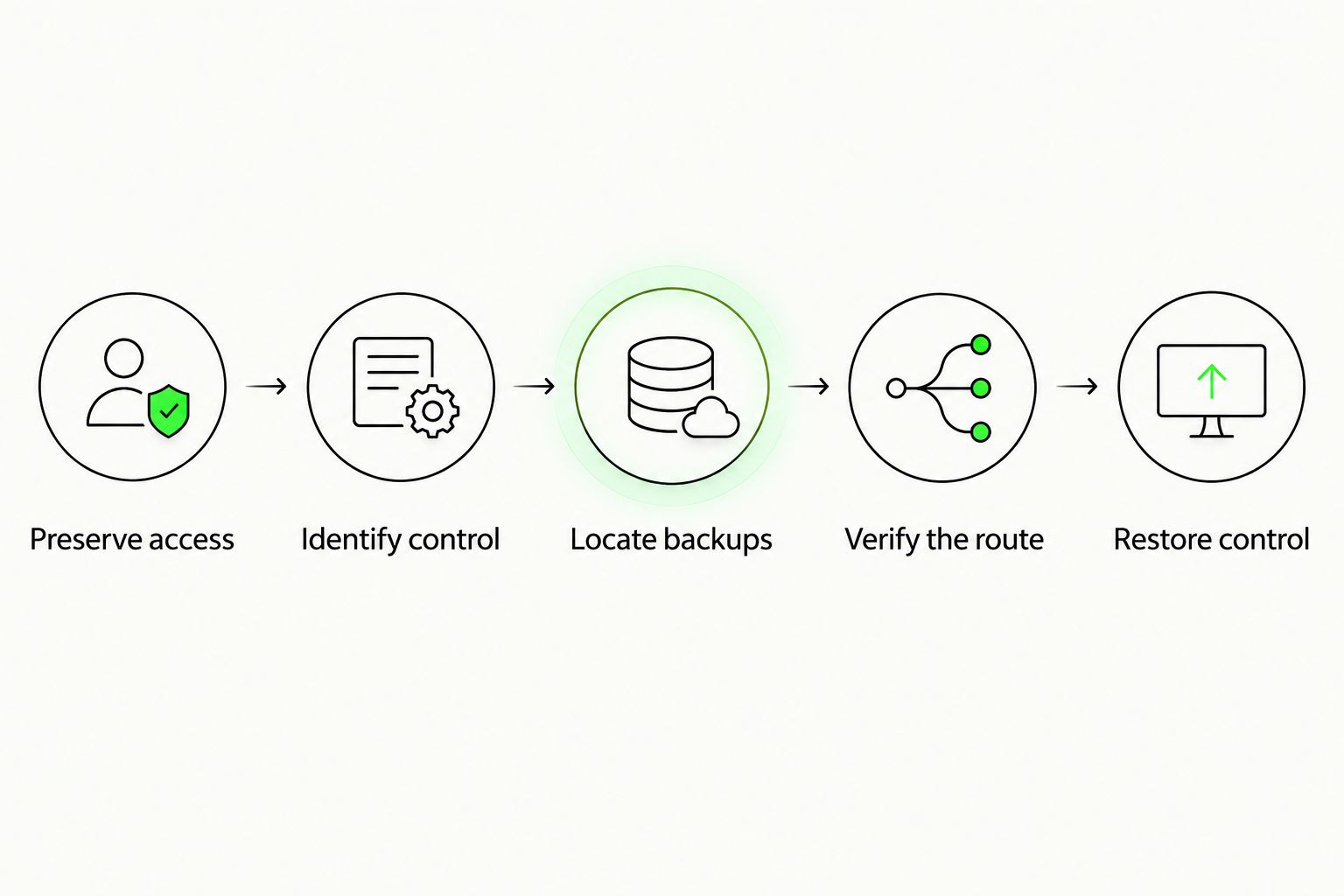
Follow this sequence before reinstalling software, resetting hardware, or entering secrets into another application. Start with observation; destructive changes come last, not first.
Preserve access
Keep any device that still opens the wallet intact. Do not uninstall the wallet, clear its storage, reset the device, or update it solely as a recovery experiment.
An accessible interface is valuable evidence, but it is not proof that the wallet can authorize transactions. Some interfaces display a saved address without retaining a usable signing key. Others require a separate hardware device or approval step.
Identify control
Determine what normally authorizes a transaction: a key stored in the app, a hardware signer, multiple signers, or a smart account. A smart account uses onchain code to define account-control rules rather than relying only on a single account key.
Use the wallet provider's official documentation to identify its architecture. Do not infer the recovery method from labels such as self-custody, seedless, or biometric login; those labels do not explain the complete control arrangement.
Locate backups
Check your existing backup locations for recovery material you deliberately saved. Relevant material includes a seed phrase, a private key, an encrypted backup, or instructions for an already configured recovery mechanism.
Keep the search local and private. Do not paste candidate secrets into search engines, support chats, AI prompts, or online verification forms. A password manager entry is useful only if it contains the information your actual recovery process requires.
Verify the route
Match the backup or recovery mechanism to the exact wallet and account. Check file compatibility, required passwords, network support, and whether an additional signer or recovery party must participate.
Documentation describes a process; it does not prove that your account was configured to use it. Confirm the relevant account settings or onchain configuration before relying on a recovery route.
Restore control
Use the verified official process for the recovery path you actually have. If an existing signer works but its backup is lost, consider transferring control to a securely backed-up replacement rather than assuming you can reconstruct the original seed.
For a conventional account, this generally means transferring assets to a new address. For a smart account, an authorized signer change can preserve the account address if its deployed rules support that action.
If your wallet still opens, can you save access?
A wallet that still signs gives you a route to preserve control, even when you cannot recover its original seed phrase. First distinguish a working signer from a watch-only view, which displays an address without the ability to authorize transactions.
Check the official instructions for confirming signing access. Do not sign an unfamiliar message or transaction supplied by a recovery helper. A signature request can authorize something unrelated to proving ownership.
If you establish that the signer works, prepare a replacement wallet and verify its recovery setup before transferring assets. Confirm the destination address and network on the trusted signing interface. Review token holdings, application positions, and other account-dependent assets rather than assuming one transfer moves everything.
Preserving control is not the same as recovering the old seed phrase. A successful transfer protects what you move; it does not make the old account recoverable later.
Can a private key or encrypted backup replace the seed phrase?
A usable private key can restore control of the specific account it governs through compatible software. It does not necessarily restore other addresses originally derived from the same seed phrase.
A seed-based wallet can derive multiple account keys from one seed. That is why recovering one exported key and recovering the complete wallet are different outcomes. Check that the restored address matches the address you intend to control before relying on it.
An encrypted backup presents another distinction: possession and usability. Encryption protects the backup's contents, so the recovery process can require a password or another decryption secret. A normal app-unlock code is not automatically the password required by a separate backup format.
Use a trusted device and the official import instructions. Never send the file and its password to a person who claims to need them for diagnosis. Together, they can provide access to the signing material.
Can guardians or another signer recover the account?
A configured recovery mechanism can replace a lost signer when the account's rules permit it. Guardians are designated participants in some recovery arrangements; their authority depends on the actual implementation, not on the word guardian itself.
Check who must approve recovery, what actions they can authorize, and whether a waiting period or other condition applies. An existing multisignature arrangement can also retain control after one signer is lost if the remaining signers satisfy its approval rules.
Neither arrangement can be added retroactively to an inaccessible account without the required authority. Contacting trusted people after losing the only key does not turn them into authorized guardians.
A passkey also needs careful interpretation. Passkeys are authentication credentials, but their role differs across wallet designs. Determine whether yours authorizes the account directly, unlocks access to another key, or participates in a separate recovery process. Do not assume an email or device-account reset restores blockchain control.
Why recovery options vary
Recovery depends on the account's existing configuration and the material you retain. These factors determine which instructions apply:
- Account architecture: A conventional key-controlled account and a smart account can have different recovery possibilities.
- Remaining signing access: An operational signer can preserve control even when the original backup is missing.
- Backup contents: A seed phrase, an individual private key, and an encrypted file restore different scopes of access.
- Decryption requirements: A backup file is useful only when you can satisfy its actual unlocking requirements.
- Configured recovery authority: Additional signers or guardians help only when the account already recognizes their authority.
- Software compatibility: The recovery application must support the key format, account arrangement, and relevant network.
These factors also explain why a successful recovery story from another wallet is not an instruction manual for yours. Match the method to your account before following it.
Can support recover a wallet from its public address?
A public address cannot reconstruct the private key needed to control a conventional wallet. Support can explain documented recovery procedures or help identify a backup format, but it cannot reset a missing blockchain key as if it were an ordinary website password.
A block explorer showing your balance confirms public account data, not recoverability. The same limit applies to wallet-data APIs: reading an account is not authorization to spend from it.
Is a seedless wallet automatically recoverable?
A seedless wallet is not automatically recoverable. The label means you need to inspect the alternative control and recovery arrangement, including its dependencies and failure conditions.
Before relying on it, identify what happens when you lose your phone, lose access to your login account, or cannot reach a recovery participant. An alternative to a seed phrase replaces responsibilities; it does not eliminate them.
FAQ
Can I recover a non-custodial wallet with only my address?
No. A public address lets you inspect public account data, but it cannot reconstruct the private key or authorize transactions.
What if I forgot my wallet password but still have the seed phrase?
A valid seed phrase generally lets you restore the corresponding seed-based accounts through compatible wallet software without the old app password. A separately configured seed passphrase is different and must also be supplied when required.
Can Face ID restore my wallet on a new phone?
Face ID alone does not establish a wallet-recovery route. Check whether the wallet uses it only to unlock local access or as part of a documented backup and recovery arrangement.
Does an encrypted wallet backup work without its password?
An encrypted backup requires its configured decryption method. Possessing the file does not guarantee that you can recover the signing material inside it.
Can I add a guardian after losing my only signing key?
You cannot add a guardian to an inaccessible account without the authority its rules require. Guardian recovery helps only when the relevant mechanism was already configured and its conditions can be satisfied.
Should I reinstall the wallet when my seed phrase is missing?
Do not reinstall as your first recovery step. Removing an application can delete locally stored wallet material, so preserve the device and identify a verified recovery route first.
Can BuildAWallet recover my lost private key?
BuildAWallet HUMAN is a wallet-blueprint design experience, not a lost-key recovery service. A design choice does not restore an existing key or activate recovery on an existing account.
Related guides
- Compare non-custodial wallet options
- Review self-custody wallet options for Base
- Compare Web3 wallets by use case
Your next step: document the recovery dependency
BuildAWallet HUMAN fits individuals planning wallet recovery requirements, not people trying to restore a lost signing key. For an existing wallet, write down which device or mechanism currently authorizes transactions and which independent backup restores that authority. Record locations and procedures, not secrets in an ordinary planning document.
Then verify that recovery process against the wallet's official instructions without deleting the working installation. If no signer or valid recovery material remains, stop sharing account details with recovery solicitors: visibility of your balance does not give anyone a hidden route to its private key.