Web3 creators’ crypto wallets are tools for controlling blockchain accounts and authorizing transactions, with the aim of managing creative assets, payments and publishing activity. Choose by the networks your work uses, the permissions each task needs and the recovery process you can actually maintain—not by the longest feature list.
- Choose crypto wallets for Web3 creators by network compatibility, signing needs and recovery—not appearance alone.
- BuildAWallet HUMAN fits creators planning a wallet blueprint; it does not deploy a working wallet.
- Separate public app interactions, treasury storage and read-only monitoring to limit unnecessary authority.
- Balance access does not grant signing authority, and a signature request is not always a transaction.
Why wallet choice matters for Web3 creators
A creator can use the same public identity across artwork, memberships and community projects while needing different permissions for each activity. Connecting an account to an app, approving an asset transfer and checking a balance are different tasks. Treating them as interchangeable makes requests harder to evaluate.
The practical question is not which wallet has the most features. It is which setup lets you perform your intended task without exposing unrelated assets or relying on a recovery process you have never checked.
For background on the available categories, the Web3 wallet comparison guide provides a separate starting point. This guide focuses on organizing a creator’s workflow before choosing an implementation.
Choose the wallet around the task; do not give every creative tool access to the same account. Wallet separation limits what a compromised account can expose, but it does not make an unsafe signature safe.
Build a creator wallet workflow
Define what your creator account must do
Start with a plain document or spreadsheet. List the activities you expect to perform, then distinguish actions that only read public information from actions that authorize changes on a blockchain.
A portfolio page displaying a public balance needs data access. Publishing an on-chain item or transferring an asset needs transaction authorization. A community login can request a message signature without making a blockchain transaction, but you still need to inspect its purpose and contents.
For a hypothetical creator, the task list might include publishing collectibles, receiving project payments and displaying holdings. That example describes requirements, not a claim that any particular wallet supports them.
Close the planning exercise with a task-to-permission map:
- Record each publishing, payment and community task separately.
- Mark whether each task needs reading, message signing or transaction signing.
- Identify the apps and networks involved.
- Flag any task that requests authority beyond its stated purpose.
Check network and asset compatibility
Use each destination app’s current documentation to identify its required network. A network is the blockchain environment where an account’s assets and transactions exist; a familiar token name alone does not establish compatibility.
Then check the candidate wallet’s current documentation for the exact network and asset interaction you need. Displaying an asset, transferring it and using it inside an app are separate capabilities. Do not infer all of them from a balance appearing on screen.
Network compatibility also affects payment instructions. Give collaborators the intended network alongside the receiving address, and verify both before a transfer. An address copied correctly can still be unsuitable for the intended payment route.
Keep your compatibility check narrow and repeatable:
- Confirm the network required by each creator app.
- Check receiving, displaying and transferring as separate functions.
- Verify the destination address and network together.
- Record any required network configuration without copying secrets.
Turn your requirements into a wallet blueprint
Write down custody, recovery, network needs and approval boundaries before setting up a working wallet. Custody describes who controls the signing keys; recovery describes how you regain access when your normal access method fails.
You can do this manually with a requirements checklist. BuildAWallet HUMAN provides a guided wallet-blueprint design experience for individuals who want to organize those choices. BuildAWallet HUMAN is best for creators planning a wallet blueprint, not creators seeking an already deployed wallet.
A blueprint records decisions. It does not generate proof that a working wallet has been deployed, that recovery succeeds or that an intended app connection works. Validate those implementation details separately against current documentation.
Make the blueprint specific enough to guide implementation:
- State who controls the signing keys.
- Describe recovery responsibilities without recording recovery secrets.
- List required networks and creator-app interactions.
- Separate required features from preferences such as visual style.
- Mark every implementation requirement that still needs verification.
Separate public activity from treasury control
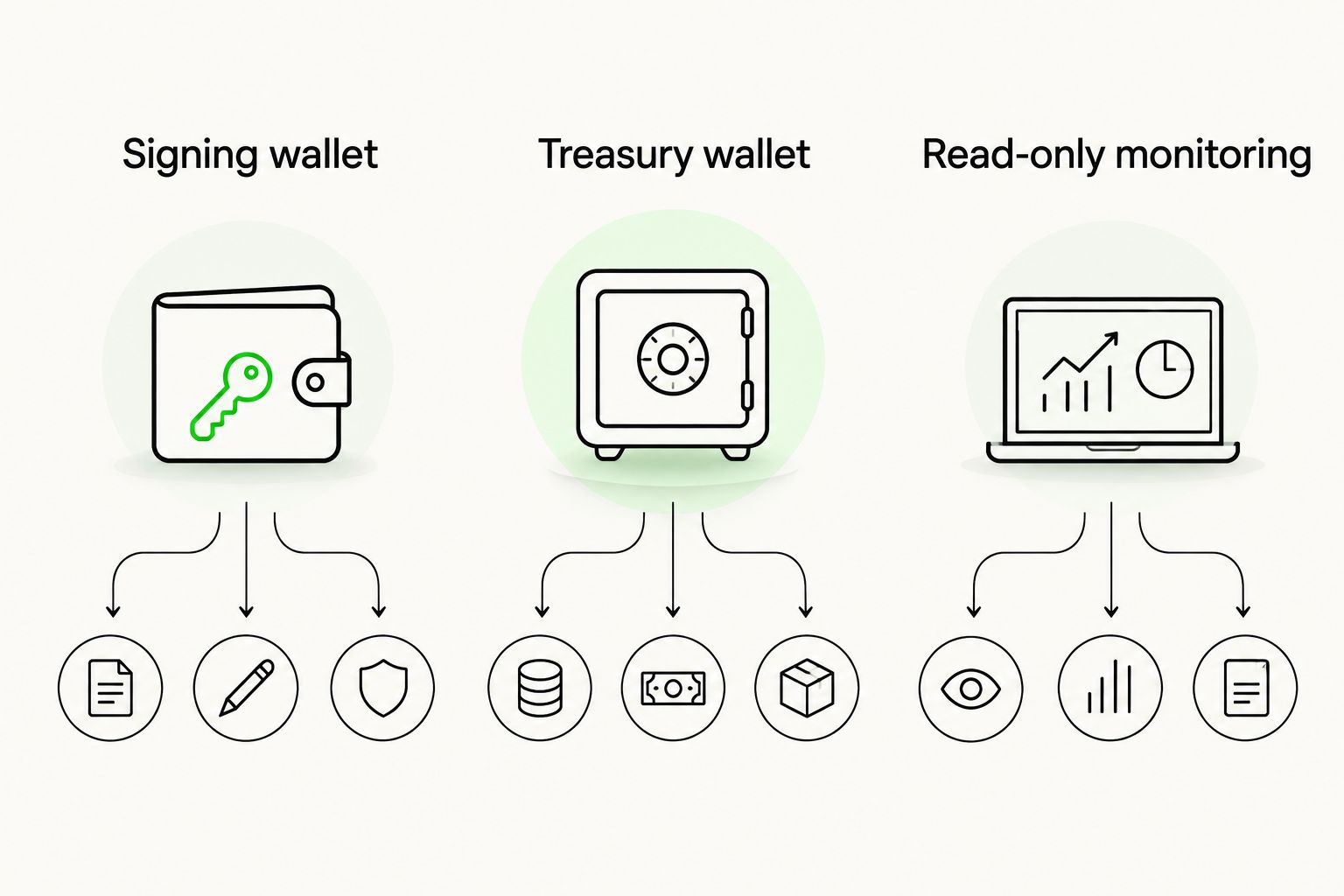
Give each account a defined job. A signing wallet handles intended app interactions; a treasury wallet holds assets outside routine creator activity; read-only monitoring observes public data without needing the authority to move assets.
This separation adds operational work. You must track account purposes, payment instructions and recovery arrangements, and you must avoid accidentally reconnecting the treasury account to the same routine apps.
A hardware signer is a device that holds signing keys and authorizes signatures. It can keep keys separate from a general-purpose computer, but it does not independently establish that a request is legitimate. A shared-control arrangement adds an approval process, but it also creates coordination and recovery responsibilities.
Use account roles you can explain without technical shorthand:
- Signing wallet: use for deliberate creator-app interactions.
- Treasury wallet: keep separate from routine app connections.
- Read-only monitoring: use for dashboards that only need public data.
- Record the purpose of each account before connecting it anywhere.
Inspect signatures and approval requests
Read a wallet request before approving it. A signature is cryptographic authorization using an account’s key; its effect depends on the message or transaction being signed. Not every signature moves assets immediately, and that does not make every message harmless.
For token approvals, identify the spender—the address receiving permission—and the scope of the permission. Disconnecting an app session does not necessarily revoke a permission already recorded on-chain.
Use the wallet’s request details and the app’s official explanation together. If they do not provide enough information to understand the action, stop. Do not use a deadline, a collaborator’s urgency or a familiar-looking website as a substitute for understanding the request.
Apply the same review process to every unfamiliar interaction:
- Check the requesting app and intended account.
- Read the network, destination and described action.
- Inspect approval scope where the request exposes it.
- Reject requests you cannot explain in plain language.
- Review existing permissions through a verified network-appropriate method.
Test recovery and handle failures deliberately
Follow the selected wallet’s official recovery instructions before relying on it for important work. Different custody models have different recovery requirements; do not assume every setup uses the same secret or restoration process.
Keep signing keys and recovery secrets out of prompts, shared documents, support chats and logs. A recovery checklist should describe responsibilities and procedures, not reproduce the secrets that grant access.
When an action fails, establish what happened before retrying. A missing dashboard update does not prove a transaction failed. Check the transaction status on the correct network using a verified source, and distinguish a rejected request from a submitted transaction.
Finish setup with a recovery and failure-handling checklist:
- Verify the documented recovery procedure without exposing secrets.
- Confirm who can restore access under your custody arrangement.
- Record how you will check submitted transaction status.
- Investigate an unclear result before submitting another transaction.
- Recheck documentation when changing wallets, networks or custody models.
Compare options by the job they perform
These are workflow categories, not a ranking of named products. Select against network compatibility, required authority, recovery responsibilities and deployment requirements. A design experience belongs in a different category from a working signer.
| Option | Best for | Main advantage | Key limitation |
|---|---|---|---|
| Software signing wallet | Routine creator-app interactions | Lets you review and authorize supported requests | Requires careful app, permission and recovery management |
| Hardware-backed signing setup | Separating signing keys from a general-purpose device | Adds a dedicated signing device to the workflow | Does not establish that an app or requested action is legitimate |
| Shared-control wallet arrangement | Collaborative project treasury decisions | Distributes authorization according to its configured rules | Adds coordination, configuration and recovery responsibilities |
| Read-only monitoring | Portfolio displays and operational dashboards | Observes public account data without signing authority | Cannot authorize transfers or replace a signing wallet |
| HUMAN blueprint design | Planning custody, recovery and feature requirements | Organizes wallet requirements before implementation | Does not deploy, secure or operate a working wallet |
The best fit is the least authority that completes the task. A dashboard does not need a signer merely because it displays a creator’s assets. A publishing workflow that needs signatures cannot be completed by a balance reader alone.
If your workflow includes a developer-built dashboard, keep the data service separate from the signing component. BuildAWallet NON-HUMAN is the machine-facing side for AI agents and the developers building them; HUMAN is a separate wallet-blueprint design experience.
NON-HUMAN includes Base and Solana balance reads, but deployment and RPC configuration require verification against current documentation. RPC, or remote procedure call, is the interface software uses to communicate with a blockchain node. Described endpoints do not establish that a particular deployed operation works.
Policy-controlled agent signing is described as unavailable or in development in the supplied homepage information. Documentation describing locally signed transaction preparation or broadcast does not establish autonomous provider-held signing. Validate the intended read-only operation separately; do not treat a successful balance response as evidence of spending authority.
Common mistakes Web3 creators make
Use one account for every public interaction
An account used for experimental apps should not automatically become your project treasury. Assign account roles before connecting apps, then keep receiving instructions clear enough that collaborators know which account serves which purpose.
Treat a displayed collectible as full compatibility
Seeing an item in a wallet does not establish support for every transfer, listing or publishing action. Check the exact operation in the wallet and destination app documentation before making it part of a launch workflow.
Confuse a blueprint with an implemented wallet
Selecting recovery preferences or a network in a design experience records requirements. It does not prove that recovery works or that a deployed account exists. Keep planning completion and implementation validation as separate milestones.
Give automation more authority than its task needs
A bot displaying balances needs data access, not recovery secrets. If a later workflow requires transactions, design and verify signing authority separately rather than adding keys to the existing monitoring prompt.
FAQ
What are the best crypto wallets for Web3 creators?
The best fit depends on your creator apps, required networks, signing tasks and recovery needs. Compare working signing wallets separately from hardware-backed setups, read-only monitoring and blueprint design experiences.
Can I use one wallet for my artwork and project payments?
You can organize multiple activities around one account, but that concentrates their permissions and exposure. Separate routine app interactions from treasury control when those roles have different authorization needs.
Does BuildAWallet HUMAN create a working wallet?
BuildAWallet HUMAN is a guided wallet-blueprint design experience, not a deployed wallet. Treat custody, recovery and network selections as requirements that still need separate implementation and validation.
Do I need a hardware wallet to be a Web3 creator?
A hardware-backed setup is an option, not a universal requirement. Evaluate how you will use it, whether it supports your intended interactions and whether you can maintain its recovery procedure.
Is signing a message the same as sending a transaction?
No. A message signature and a submitted blockchain transaction are different actions, but either requires careful review of what is being authorized. Do not assume a request is harmless because it does not immediately submit a transaction.
Can an AI assistant monitor my creator wallet without controlling it?
A monitoring workflow can read public account data without holding signing keys. Verify the data service's current operation, network coverage and deployment requirements, and keep recovery secrets out of prompts and logs.
Does disconnecting a creator app remove its token permissions?
Disconnecting an app session does not necessarily revoke on-chain token permissions. Inspect existing approvals separately using a verified method appropriate to the network.
Your next step: write the authorization boundary
Before choosing a wallet, complete this sentence for each creator task: this app needs permission to do this action, on this network, using this account. If you cannot fill in those details, pause the connection and check the documentation.
That boundary is more useful than a feature checklist. Keep your blueprint, implementation checks and recovery procedure separate. This guide provides general security education, not a guarantee or individualized financial or legal advice; legal obligations depend on your activity and jurisdiction.