Yes, a Solana balance check can run inside a trading bot as a read-only step before the bot evaluates or submits a trade. The check does not authorize spending: transaction signing needs separate authority, and a successful balance response does not prove that a proposed trade will succeed.
- A Solana balance check inside a trading bot supplies balance data, not permission to spend.
- BuildAWallet NON-HUMAN covers machine-facing wallet data; verify deployment and the intended Solana operation before integration.
- Distinguish native SOL from token balances, validate units, and reject stale or failed reads.
- Keep signing credentials outside the balance tool and enforce spending rules separately.
Can a Solana balance check run inside a trading bot?
Place the balance check between identifying a possible trade and requesting transaction approval. Your application reads the relevant account, validates the response, and decides whether the trading workflow can continue. Keep this component separate from the signer—the component that authorizes a transaction using a private key or another signing mechanism.
BuildAWallet NON-HUMAN is the machine-facing side for AI agents and the developers building them; HUMAN is a separate wallet-blueprint design experience.
For this task, the relevant product boundary is NON-HUMAN's machine data access, including Solana balance reads. HUMAN does not deploy a trading wallet or grant a bot signing authority.
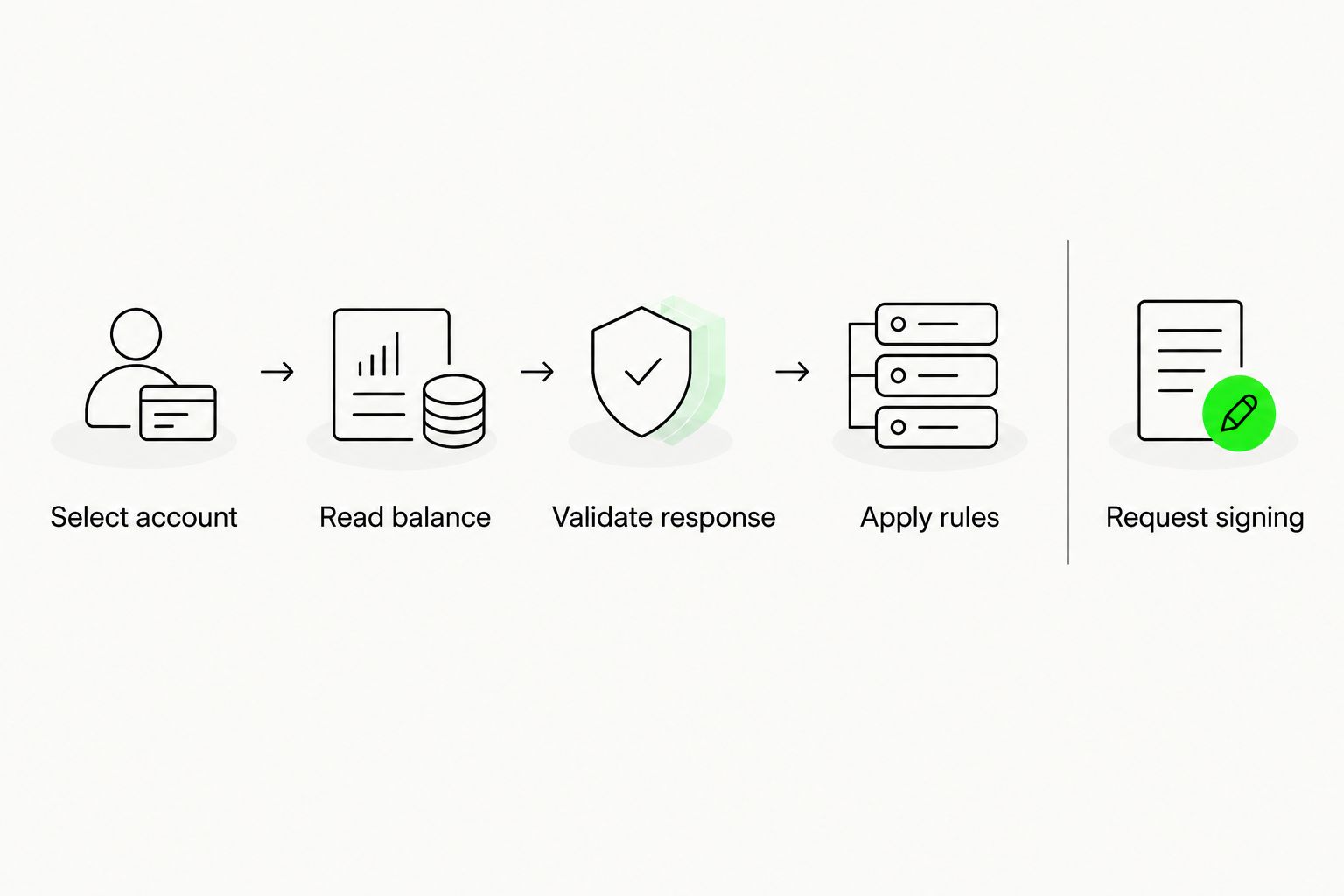
A practical implementation follows this sequence:
- Select account. Identify the Solana network, public address, and asset needed for the decision.
- Read balance. Request the intended balance through a validated data source.
- Validate response. Check account identity, units, freshness evidence, and failure status.
- Apply rules. Compare the usable balance against your application's trade requirements.
- Request signing. Pass an eligible transaction to a separately controlled signing workflow.
The balance reader should stop at returning validated data. It should not quietly become the component that constructs, approves, and signs trades.
Why this matters: a balance is not trade approval
A balance check answers a narrow question about account state. It does not establish that the bot has permission to spend, that a transaction meets your policy, or that the account will remain unchanged until execution.
Use a balance check as an input to trade eligibility, not as the final authorization. Another transaction can change the account after the read. A proposed trade can also fail because of transaction requirements unrelated to the displayed balance.
This distinction matters even when the same application runs every stage. Separate interfaces make it easier to test the reader without exposing signing credentials, and to disable trading without disabling monitoring.
Which component belongs in your bot?
Choose by responsibility rather than treating every wallet-related service as interchangeable. A data source, a transaction-preparation component, and a signer solve different problems.
| Component | Best for | What it contributes | Limitation |
|---|---|---|---|
| Direct Solana RPC reads | Developers managing their own account queries | Reads from a Remote Procedure Call interface, which lets software request blockchain data | Your application must handle response validation and its chosen provider's requirements |
| Machine-facing balance service | Developers evaluating a dedicated data-access layer | Balance data through the service's verified operation | Deployment, payment access, response details, and operation availability require validation |
| Local signing workflow | Applications that separately control transaction authorization | Signing with credentials controlled outside the balance reader | Does not replace reliable balance data or application policy checks |
| HUMAN wallet blueprint | Individuals planning wallet requirements | A design specification covering wallet choices | Not a deployed wallet, bot data source, or transaction signer |
BuildAWallet NON-HUMAN is relevant for developers evaluating machine-facing wallet data, not for obtaining autonomous signing authority. Its stated Solana balance-read scope fits this evaluation; deployment requirements and operation-specific availability remain checks you must complete.
Do not choose a balance service because its documentation also mentions transactions. Evaluate the exact read operation first, then assess any transaction workflow independently.
What balance should the bot check?
Native SOL balance
Native SOL is distinct from tokens held through Solana token accounts. Solana's standard getBalance RPC method returns an account's native balance in lamports, the smallest unit of SOL. 1 SOL equals 1,000,000,000 lamports.
For an illustrative conversion, 500,000,000 lamports equals 0.5 SOL. That conversion says nothing about the balance of a separate token or how much SOL your application should reserve.
Keep the original integer amount alongside any display value. Use integer arithmetic for native-unit comparisons so that formatting does not change an eligibility decision.
Token balance
A native SOL read does not answer how many units of a particular token a wallet holds. For token-based strategies, identify the intended token by its mint address—the on-chain identifier for that token—and validate the associated token-account data.
Do not identify an asset by its display symbol alone. Your application should confirm the mint, account ownership, and decimal interpretation required by its strategy.
If your workflow consumes normalized balances, use the balance-decimal parsing guide to structure the validation questions. Do not assume an unverified service returns native SOL, token balances, or both in the same response.
Balance versus usable amount
Your application must distinguish the returned balance from the amount it permits a strategy to use. Account for transaction fees and any reserves your own policy requires before passing a candidate transaction onward.
For example, an illustrative response showing 2 SOL is not approval to spend 2 SOL. The usable amount depends on the proposed transaction and your configured restrictions; a balance response alone cannot supply those decisions.
How do you validate a balance source before connecting it?
Start with a read-only evaluation. Do not give the balance component a trading key just to discover whether its data operation works.
Confirm the operation and deployment
Read the current official documentation for the specific Solana operation. Confirm the deployment and RPC configuration it requires, along with authentication or payment prerequisites, before treating documentation as an operational service.
BuildAWallet's supplied product notes distinguish homepage deployment requirements from a broader documented endpoint catalog. They also distinguish locally signed transaction preparation and broadcast from policy-controlled agent signing, which the homepage describes as unavailable or in development.
A documented endpoint is not proof of a successfully deployed operation. Use the wallet API deployment validation guide to organize your checks, then verify the intended read against the current official documentation and actual response.
Check discovery without mistaking it for execution
An agent can be directed to verified service documentation by your application configuration. If you use a NON-HUMAN overview, llms.txt, an agent manifest, or an OpenAPI specification for discovery, inspect the current document before describing or depending on its contents.
These documents are pointers and interface descriptions. They do not establish that a paid request succeeds, that a framework integration works, or that signing is available. Keep discovery, successful data retrieval, and transaction authority as separate validation outcomes.
Validate the returned account state
For your intended read, check the following before the bot consumes the result:
- Identity: the response corresponds to the requested account and network.
- Asset: the value represents native SOL or the intended token, not an ambiguous aggregate.
- Units: the application correctly interprets integer amounts and decimals.
- Freshness: the available context satisfies your application's recency rule.
- Outcome: an error, timeout, or incomplete response remains distinguishable from a valid zero balance.
Where the service does not expose enough information for a required check, do not manufacture certainty in your adapter. Reject that input for the trading decision or choose a source that meets the requirement.
Why balance-check behavior varies
A balance check's usefulness depends on the application and data path, not just whether a request returns successfully.
- Asset scope: reading native SOL and reading token-account balances answer different questions.
- State selection: the selected commitment level determines which confirmation state a Solana RPC read requests. Commitment describes how confirmed the reported blockchain state is.
- Concurrent activity: another process or pending transaction can change the account after your check.
- Caching: a reused response needs an explicit age policy rather than an assumption that it is current.
- Service requirements: deployment, RPC configuration, access controls, and payment handling affect whether the intended operation is usable.
- Authority separation: a valid read does not establish what the signer is allowed to authorize.
Define these choices in application configuration and tests. Instructions in an agent's prompt are not substitutes for enforced restrictions in the execution path.
What should the trading bot do when a balance check fails?
Treat an invalid balance as unavailable data, not as zero and not as permission to continue. Stop the balance-dependent trade path and return a reason your monitoring system can distinguish.
A timeout, a malformed response, and a valid zero balance require different handling. Converting all three into the same numeric value hides operational failures and makes debugging harder.
Use an application-side adapter with explicit outcomes such as valid, unavailable, or rejected. These are suggested internal states, not claims about any provider's response format.
| Condition | Recommended application behavior |
|---|---|
| Valid response with insufficient usable balance | Reject the candidate trade |
| Failed or incomplete request | Block the balance-dependent decision and record the failure category |
| Response exceeds your freshness limit | Obtain a fresh read or stop the trade path |
| Account, network, or asset mismatch | Reject the response rather than coercing it |
| Payment outcome is uncertain | Reconcile the request outcome before attempting another chargeable request |
Set bounded retries according to your application's policy and the provider's verified behavior. Do not assume that repeating a paid request is free, deduplicated, or safe merely because the previous response was lost.
Keep private keys, seed phrases, payment credentials, and recovery secrets out of prompts and logs. Record enough non-secret context to diagnose failures without exposing signing authority.
Can a successful read guarantee a trade will execute?
A successful read cannot guarantee execution. The account state can change between validation and submission, and the transaction must still satisfy its own requirements.
Recheck balance-dependent conditions close to the signing decision where your architecture permits it. The signer should independently enforce its applicable rules rather than accepting an agent's statement that a previous check passed.
For the broader separation between reads, local signing, and spending authority, see the crypto wallet access guide for AI agents.
Does checking a balance require a private key?
Reading a public Solana account balance does not require that account's private key. A data provider can still require its own access credentials or payment authorization; those are different from the wallet's transaction-signing credentials.
Keep these credential classes separate in code and configuration. A compromised balance-reading component should not automatically gain access to the trading signer.
FAQ
Can I run a Solana balance check inside a trading bot?
Yes. Run the check as a read-only input to trade eligibility, then validate the account, asset, units, and freshness before a separate signing decision.
Does a Solana balance API need my wallet's private key?
Reading a public account balance does not require the account's private key. Provider access credentials or payment authorization are separate requirements and should not expose your transaction signer.
Does a SOL balance include all my Solana tokens?
A native SOL balance does not include balances of separate tokens. Token-based strategies need the intended mint and token-account data, with the correct decimal interpretation.
Can BuildAWallet sign trades for my bot?
Do not assume autonomous signing is available. The supplied product notes distinguish local signing workflows from policy-controlled agent signing described as unavailable or in development; verify the current operation before relying on it.
What should my bot do if the balance request times out?
Block the balance-dependent trading decision until you obtain valid data. Keep a timeout distinct from a valid zero balance, and reconcile uncertain paid-request outcomes before retrying.
How many lamports are in one SOL?
1 SOL equals 1,000,000,000 lamports. Preserve the integer amount for comparisons and convert it separately for display.
Does a fresh balance check guarantee my trade will succeed?
No. Account state can change after the read, and transaction execution has requirements beyond the observed balance; keep final authorization separate.
Related guides
Next step: test the stop condition first
Before connecting a signer, test whether your bot stops when the balance reader returns unavailable, mismatched, or stale data. A read-only integration is not ready for trading merely because its successful response parses correctly.
Then verify the intended Solana read against current documentation and deployment requirements. Add signing only after the balance component, failure handling, and separately enforced authorization rules pass your application's checks.